Skip to content
  • Home
  • Recent
Collapse
Brand Logo
CRYSTAL23
Latest v1.0.1
Tutorials Try the Demo Get a License
Tutorials Try the Demo Get a License Instagram
aerba

Alessandro Erba

@aerba
Developer
Unfollow Follow
About
Posts
115
Topics
1
Shares
0
Groups
1
Followers
9
Following
8

Posts

Recent Best Controversial

  • Generatinng INPUT file for difference map of electron charge density and electrostatic potential plot
    aerba aerba
    Electron Charge Density Analysis

    Hi,

    When computing (and then plotting) 2D maps of the electron density, or spin density (by use of the ECHG keyword), or electrostatic potential (by use of the POTM keyword), a plane must be specified. Now, in CRYSTAL a plane is specified by three points A, B, and C (i.e. if you specify the coordinates of three -- non rectilinear -- points, you identify a unique plane).

    In CRYSTAL, you can specify the three points A, B and C in two ways:

    1. You can directly input the Cartesian coordinates of the three points by use of the COORDINA keyword;

    2. You can select three atoms as your three points, with the ATOMS keyword. In this case, as the system is periodic and you may need to refer to atoms outside of the reference cell, each atom is identified by four integer numbers (the sequential index of the atom within the reference cell and three indices identifying the cell where your selected atom is centered -- i.e. 4 0 0 1 for instance means atom number 4 in the list, found in cell 0 0 1, that is a cell translated by one lattice vector along the c crystallographic axis).

    Now, if the three points A, B and C that you have defined are not "orthogonal", i.e. the angle \( \widehat{ABC} \neq 90^\circ\) this would produce an oblique map. To make it rectangular, you can insert the RECTANGU keyword, as shown below:
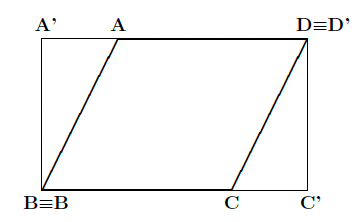
    Screenshot 2025-07-29 alle 08.44.55.png

    You can also change the explored range in the selected plane (relative to that identified by the three original points A, B and C) by use of the keyword MARGINS, as shown below:
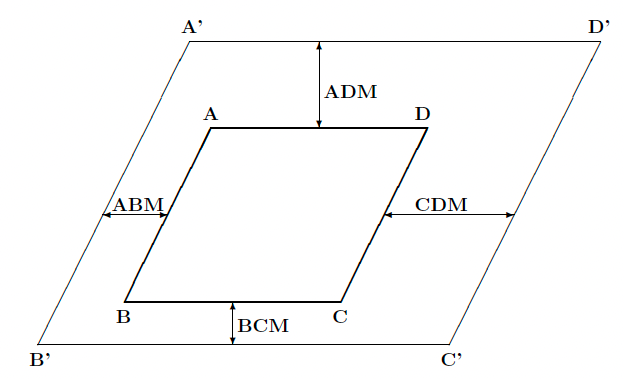
    Screenshot 2025-07-29 alle 08.45.09.png

    Input examples can be found at this tutorial page.

    Hope this helps,

  • Charge State Calculation for periodic System in CRYSTAL17
    aerba aerba
    Single-Point Calculations

    Hi,

    To run a calculation with a not neutral unit cell, you must insert the keyword CHARGED at the end of the basis set input block, as in:

    Title
    [geometry]
    END
    [basis set]
    CHARGED
    END
    [SCF parameters]
    END
    

    Hope this helps,


  • Conversion of fort.25 file to .cube (Vesta file)
    aerba aerba
    Electron Charge Density Analysis

    Hi,

    You can compute the electron density on a 3D grid of points and obtain data directly saved in a .cube format by use of the ECH3 keyword of the PROPERTIES module. If your system is 3D, all you have to do is insert something like:

    ECH3
    100
    END
    

    in your .d3 PROPERTIES input file, where 100 is the number of points in the grid along the first axis. For a cubic system, this would produce a 100x100x100 grid.

    Hope this helps,


  • Is there a software to create DOS/BAND input?
    aerba aerba
    Band Structure

    Hi,

    I haven't used it in a while but I remember XCrySDen had a GUI for k path selection.

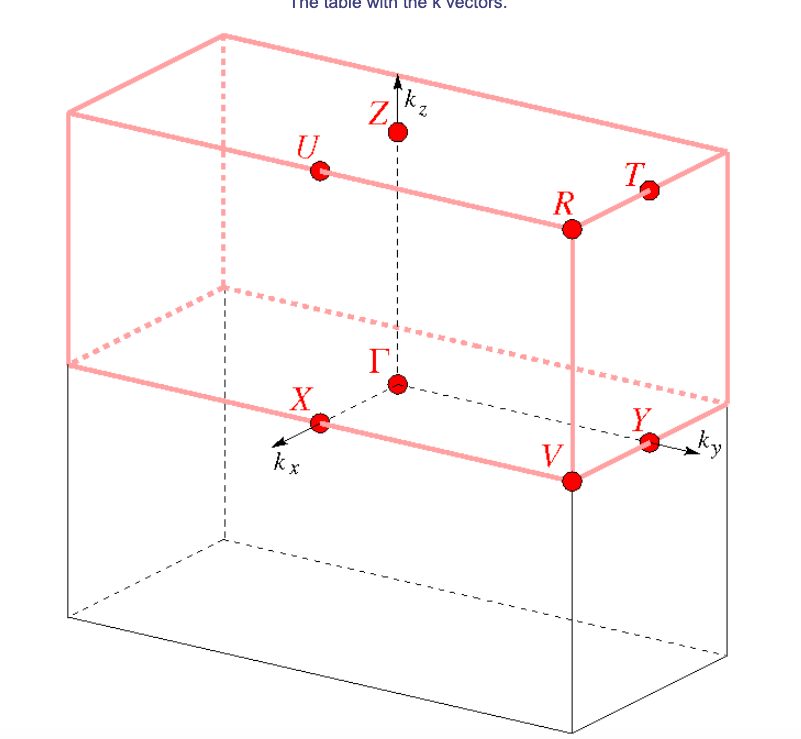
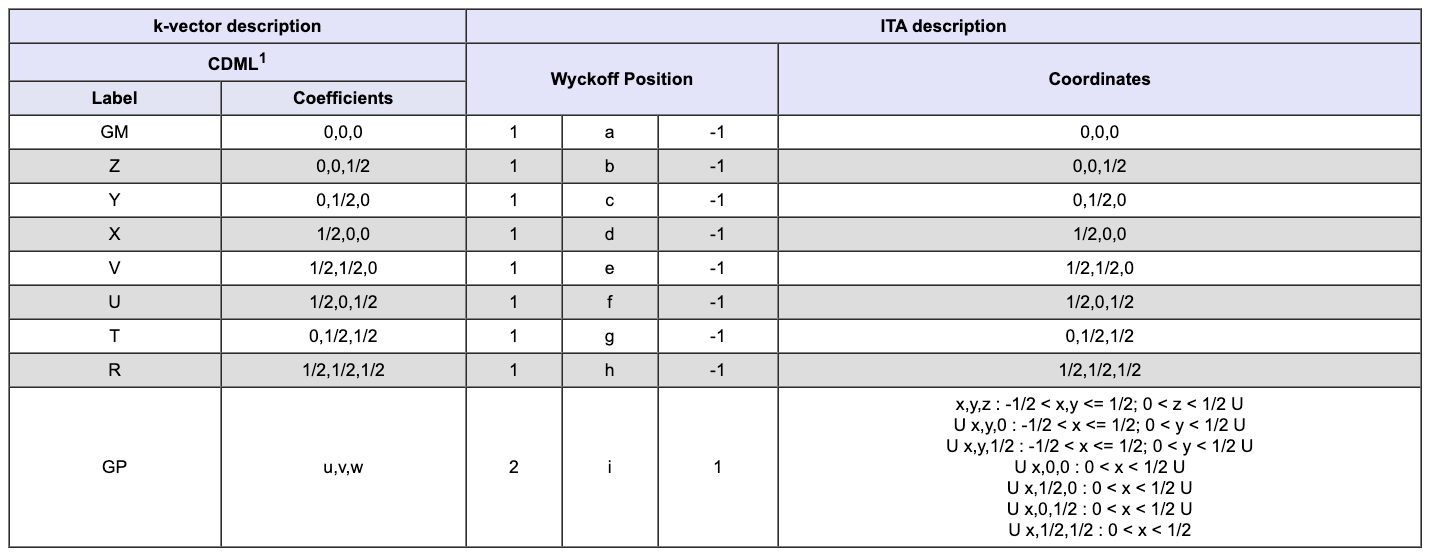
    What I typically do instead is use the Bilbao Crystallographic Server as a guide. If you navigate to "Space-group Symmetry" and then to "KVEC: The k-vector types and Brillouin zones of Space Groups", you will be able to select your space group of interest and then click on "Comparative listing of k-vector types".

    For instance, for your P-1 space group you get:

    Screenshot 2025-07-23 alle 08.42.42.png

    where you can find the coordinates of the high symmetry special points listed in the table (NOTE: if your space group admits a crystallographic cell that differs from the primitive cell, you will find both sets of coordinates in the table. Make sure you use the primitive ones to write the BAND input in the .d3 file) and also inspect the Brillouin zone:

    Screenshot 2025-07-23 alle 08.43.02.png

    The order at which you explore these points does not really matter (unless you want to reproduce a specific path from some reference plot), as long as you explore most/all of them.

    Hope this helps,


  • Negative value in the SCF of an anion vacancy
    aerba aerba
    Geometry Optimisations

    Hi,

    Would you please share your full input file?


  • Problem with restarting CPKS calculation
    aerba aerba
    Response Properties (CPHF/KS)

    Dear Aparajita,

    Gryffindor said in Problem with restarting CPKS calculation:

    I’m reaching out again regarding the CPKS step. After several attempts (and a fair bit of persistence!), I was finally able to complete the SCF calculations.

    Good!

    Gryffindor said in Problem with restarting CPKS calculation:

    As per your previous suggestions, I ensured the SCF was converged beforehand, but unfortunately, the CPKS has never been able to finish successfully on my side.

    Is there a reason for switching DIIS off in your CPKS calculation?

    Also, you can change the convergence criterion for the CPKS with the TOLALPHA keyword. In your case, it may be enough to run it with:

    CPKS
    TOLALPHA
    2
    END
    

    Gryffindor said in Problem with restarting CPKS calculation:

    Since I need these results quite urgently, I was wondering if you could try running it on your end to see if there's anything I'm missing?

    I am afraid I can not. It is a huge calculation that you are running on 800+ atoms/cell and I do not have the computing power for this.


  • Problem with restarting CPKS calculation
    aerba aerba
    Response Properties (CPHF/KS)

    Dear Aparajita,

    It is strange that the fort.9 unit is empty. May it be a problem of the script in copying back that unit from the scratch folder to the working directory?

    Anyway, you can try to trick CRYSTAL in this way:

    • By inspection of your output file:
    CYC  13 ETOT(AU) -1.952535840054E+05 DETOT -1.58E-05
    

    the energy difference is down to 10^-5 at cycle 13. So, you can try to run the calculation with a low energy convergence threshold of just 10^-4 with something like this:

    TOLDEE
    4
    

    and the SCF would be considered as converged for the program. In this way the calculation is not killed and probably you will get your fort.9 unit,;

    • you can then use it to do a restart calculation with the GUESSP keyword (and by tightening the energy convergence threshold to something like TOLDEE 7, or 8):
    GUESSP
    TOLDEE
    7
    

    Hope this helps,


  • No space left on device
    aerba aerba
    Running CRYSTAL in Parallel

    job314 said in No space left on device:

    those are huge HPC nodes… they can’t be possibly out of disk…

    On our cluster, although the total disk space is huge, there are limited disk quotas for each user. Maybe it is the same there for you?

    job314 said in No space left on device:

    will it affect my convergence or calculation speed?

    Possibly, but not much I think.


  • No space left on device
    aerba aerba
    Running CRYSTAL in Parallel

    I can not tell the origin of the problem for sure but one thing you could try is to use the HISTDIIS keyword to set a lower maximum number of Fock matrices to be stored on disk for the DIIS convergence accelerator.

    You could try with something like:

    HISTDIIS
    10
    

    or less.

    Indeed, this piece of your output suggests that all Fock matrices from all previous SCF iterations are stored:

    job314 said in No space left on device:

    DIIS ACTIVE - HISTORY: 23 CYCLES

    When the system size is large and the SCF takes many iterations to converge, this may require lots of data to be stored on disk.

    Let me know if this helps.


  • Negative density of states
    aerba aerba
    Density-of-States

    Hi,

    From what I see you get very few negative values. Typically, it is an artifact of the interpolation method. Sampling the DOSS at more energy points and/or changing the number of Legendre polynomials used in the DOSS expansion solves the problem.


  • ERROR **** PGGP **** G-VECTOR NOT FOUND IN PREVIOUS DENSITY MATRIX
    aerba aerba
    Vibrational Spectroscopies: IR, Raman, INS

    job314 Yes, this makes sense now that I think about it. Still, it would be advisable to restart the frequency job from the optimized geometry for one technical - and yet important - reason: the so-called FIXINDEX strategy used in CRYSTAL.

    In the evaluation of the integrals, a list of interactions to be computed is defined at the beginning of the calculation and kept constant (the list, not the interactions) throughout the calculation to ensure numerical smoothness. This list is generated from the starting geometry in the input. It is better for it to be the optimized one. In many cases this may not be critical but it could lead to numerical issues if the inputed geometry is far from the equilibrium one.


  • Error in RESTART of FREQCALC calculation
    aerba aerba
    Vibrational Spectroscopies: IR, Raman, INS

    PeterRemoto At the moment I am afraid I do not have an explanation for the difference you experienced between CRYSTAL17 and CRYSTAL23 as I am unable to reproduce the erratic behavior with CRYSTAL23.


  • Error in RESTART of FREQCALC calculation
    aerba aerba
    Vibrational Spectroscopies: IR, Raman, INS

    PeterRemoto I have tried to restart your calculation with CRYSTAL23 following my step-by-step recipe (described at https://forum.crystalsolutions.eu/post/339) and it worked.

    This is what I did:

    • I prepared an input file to run the harmonic frequency calculation, without intensities, I ran it and I killed it in the middle of the construction of the Hessian. From this incomplete frequency calculation, I obtained the FREQINFO.DAT file (I can not upload it here as it exceeds the maximum allowed file size), the external unit with the density matrix, i.e. fort.13 unit, and the external unit with the wavefunction, i.e. fort.9;

    • I prepared an input file to restart the frequency calculation and provided the FREQINFO.DAT, fort.13 and the fort.9 (renamed as fort.20) files from the previous step, and ran it. The calculation of the Hessian restarted correctly, with the new SCFs converging nicely (see the attached SCFOUT.LOG file). I then stopped the calculation not to use too much compute power on my cluster.

    If you follow this step-by-step process you'll be able to safely restart your frequency calculations with CRYSTAL23.

    Hope this helps,


  • Error in RESTART of FREQCALC calculation
    aerba aerba
    Vibrational Spectroscopies: IR, Raman, INS

    PeterRemoto I started drafting a reply but encountered problems in uploading the files. Will try later.


  • Error in RESTART of FREQCALC calculation
    aerba aerba
    Vibrational Spectroscopies: IR, Raman, INS

    PeterRemoto I just started running some tests on this case. I will keep you posted on how it goes.


  • QHA-LD with phonons from entire Brillouin zone
    aerba aerba
    Harmonic and Anharmonic Lattice Dynamics and Thermodynamics

    Dear Georg,

    It is correct. Note that of course if you build a supercell, band folding will bring back at Gamma phonons that would be formally assigned to other k points, which in the end allows for QHA calculations also with phonons out of Gamma.

    For instance with something like:

    SUPERCEL
    2 0 0
    0 2 0
    0 0 2
    QHA
    END
    

    you would be building a 2x2x2 supercell (relative to the primitive one), and performing a QHA on it (i.e. from harmonic frequencies computed on the supercell, and thus equivalent to phonons at 8 k points).

    Hope this sheds some light on the matter,


  • QHA in monoclinic system with non-constant angle
    aerba aerba
    Harmonic and Anharmonic Lattice Dynamics and Thermodynamics

    Hi Georg,

    In the .out output file you can find the optimized structures at different volumes from the EOS. By searching for "CELL DEFORMATION" you will get to the point of the output where a deformation (compression/expansion) is applied. The corresponding strain matrix is printed right below. Something like:

    ********************************************************************************
    CELL DEFORMATION
    *******************************************************************************
    
        ELASTIC STRAIN MATRIX (ADIMENSIONAL)
    
        1   -0.0101017008   -0.0000000000   -0.0000000000
        2   -0.0000000000   -0.0101017008   -0.0000000000
        3   -0.0000000000   -0.0000000000   -0.0101017008
    

    From there, by searching for "OPT END" you will get to the point where the constant-volume optimization ended. Something like this:

     ******************************************************************
     * OPT END - CONVERGED * E(AU):  -1.385471079118E+04  POINTS   16 *
     ******************************************************************
    

    Right below this, you will find the optimized structure. First a list of atomic neighbors and then the actual lattice parameters and atomic coordinates right below the string "FINAL OPTIMIZED GEOMETRY".

    From here, by searching again for "CELL DEFORMATION" you will get to the second explored volume, and so on and so forth.

    In this way you can check how all structural parameters (including the beta angle) evolve with volume.

    It is true that at the end of the QHA calculation, CRYSTAL is currently not computing the thermal expansion coefficients for the lattice angles. I initially coded just the volumetric thermal expansion coefficient, then added the three linear coefficients for the lattice vectors. I may have to add those for the angles as well.

    Still, there should be the necessary information in the output to evaluate it. EOS gives you the dependence of beta on the volume (see above) and QHA the dependence of the volume on temperature.

    Hope this helps,


  • QHA in monoclinic system with non-constant angle
    aerba aerba
    Harmonic and Anharmonic Lattice Dynamics and Thermodynamics

    Hi Georg,

    The EOS/QHA algorithm in CRYSTAL is general (i.e. with no particular restrictive assumptions on the space group) so I would expect it to find the optimal structure at each explored volume by fully relaxing all symmetry-allowed structural degrees of freedom.

    Is beta not changing at all or "just" not as much as expected?

    Happy to have a look at your input/output files if you think it could help.


  • Advice on frequency calculations on large solid systems -
    aerba aerba
    Vibrational Spectroscopies: IR, Raman, INS

    Hi,

    Thanks for the update! I still hadn't had the time to look carefully into this. Now, by looking at your input file, I just noticed that you are using ANDERSON for the INTCPHF step instead of DIIS, which is the default option in CRYSTAL23. Can I ask you why you decided to switch to ANDERSON? Was DIIS not converging? If you instead used ANDERSON straight away, may I suggest to remove it and thus use DIIS and see how it behaves as a test?


  • Problem with restarting CPKS calculation
    aerba aerba
    Response Properties (CPHF/KS)

    Hi,

    You are running a quite large calculation here, with 800+ atoms/cell!

    You are not getting the fort.31 unit to restart the CPKS step because your calculation did not make it to the CPKS step 🙂

    Let me explain: before getting to the CPKS step, an SCF is performed. Your calculation stopped at cycle 14 of the SCF. By looking at your input/output file, I can suggest four things:

    • In the output, you can find this warning:

    WARNING **** GENBUD **** COUL. BIPO BUFFER TOO SMALL - TO AVOID I/O SET BIPOSIZE = 14808875

    which means that the program is swapping to disk. To avoid this and make things faster, you can insert the following keywords in the input file:

    BIPOSIZE
    14808875
    
    • I noticed you inserted the NODIIS keyword in the third block of the input. This is switching DIIS off for the SCF, not for the CPKS step. If this is what you want, ok then. Otherwise, I suggest you remove this keyword from there to keep DIIS active for the SCF.

    • If you want, you can restart the SCF by use of the GUESSP keyword, to start from the last density matrix of the previous incomplete job (through the fort.9 unit, to be renamed as fort.20).

    • remove the RESTART keyword from the CPKS block because, effectively, there is nothing to be restarted there.

    If you do these four things, your input would look like:

    ZIF-90_VOCs
    EXTERNAL
    CPKS
    END
    BASISSET
    mybasis
    DFT
    HSE06
    END
    SCFDIR
    TOLINTEG
    7 7 7 7 14
    TOLDEE
    7
    SHRINK
    1 1
    FMIXING
    90
    BIPOSIZE
    14808875
    GUESSP
    END
    

    Hope this helps,

  • 1 / 1
  • Login

  • Don't have an account? Register

  • Login or register to search.
  • First post
    Last post
0
  • Home
  • Recent